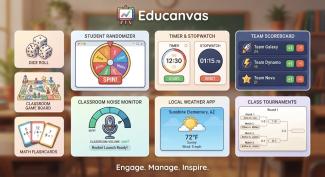
EduCanvas is a powerful, browser-based teaching tool designed to bring your classroom to life. With a flexible, drag-and-drop canvas, teachers can build fully interactive lessons in seconds using a wide variety of dynamic tools — now enhanced with AI-powered features and touch-friendly design.
Create, customize, and control your teaching space exactly the way you want it.
🎯 Key Features
🧩 Fully Customizable Canvas
Arrange, layer, and organize tools anywhere on the screen to match your teaching style. Build your perfect teaching workspace with complete flexibility.
🧠 Interactive Classroom Tools
Includes timers, dice, randomizers, text boxes, whiteboards, group makers, scoreboards, and more — everything you need to keep students engaged and learning.
🖱️ Drag-and-Drop Windows
Move, resize, and organize tools just like a desktop workspace. Create clean, functional layouts or dynamic, interactive lesson boards.
📚 Multi-Screen Lesson Builder
Create and manage multiple screens within a lesson and easily switch between them. Reorder screens with simple drag-and-drop to match your lesson flow.
💾 Save & Load Layouts
Store your classroom setups and access them from any device. Pick up right where you left off with zero setup time.
👩🏫 Student Management
Add and manage student names and skill levels to use across tools like randomizers, group makers, and more.
🎨 Drawing & Annotation Tools (Upgraded)
Write, highlight, and interact directly on your canvas with an improved drawing experience.
✏️ Dedicated Draw button for quick access
🎛️ Floating toolbar with color, tool type, and line size controls
🧽 One-click clear drawing option
📱 Optimized for touchscreens and interactive boards
Perfect for modeling thinking, solving problems, or annotating text in real time.
✍️ Enhanced Text Tool
Create rich, formatted text boxes with powerful editing features:
🔗 Add clickable links directly to text
🧾 Sticky formatting toolbar that stays visible while scrolling
🎨 Full formatting controls including fonts, colors, lists, and alignment
Ideal for agendas, directions, anchor charts, and interactive content.
🤖 AI-Powered Exit Tickets & Questions
Instantly generate meaningful questions using built-in AI tools.
🎯 Generate questions based on:
- Grade level
- Subject
- State standards
- Custom topics or keywords
🧠 Supports:
- Exit tickets
- Trivia questions
- Multiple choice or open response
👀 Present questions in a clean, full-screen display
🔒 Keep answers hidden until you're ready with Reveal Answer
💡 Includes explanations to support deeper understanding
Perfect for quick checks for understanding, lesson closures, or engagement boosts.
📊 Live Feedback & Student Response Tools
Turn your lessons into two-way interactions with real-time student input:
📱 Collect instant responses from students during lessons
🗳️ Run quick polls to check understanding or gather opinions
🎯 Use exit tickets to assess learning at the end of a lesson
📈 View responses live to guide instruction in the moment
Perfect for checking comprehension, adjusting pacing, and making sure every student voice is heard.
🏆 Scholar Stash Classroom Reward System
Bring motivation and classroom management together with Scholar Stash, a built-in, fully customizable reward system.
💰 Create your own classroom currency (no limits on value)
➕ Instantly reward students with sound effects and confetti celebrations
➖ Redirect behavior with visual feedback and sound cues
🛍️ Let students spend earned currency with satisfying “ka-ching” interactions
📊 Track balances for every student in one clean, easy-to-use dashboard
⚙️ Fully adjustable reward, penalty, and spending amounts
Designed to feel engaging like ClassDojo — but with more flexibility and control for teachers.
🔊 Real-Time Feedback & Engagement
Make your classroom feel alive with built-in interactive feedback:
🎉 Confetti celebrations for positive reinforcement
🔊 Sound effects for rewards, spending, and behavior redirects
🔴 Visual screen feedback for immediate classroom cues
These small touches create big engagement and reinforce behavior in real time.
📱 Touch-Friendly & Classroom Ready
Designed with real classrooms in mind:
🖐️ Large, easy-to-tap buttons
📺 Optimized for interactive boards and touchscreens
🎯 Reduced reliance on hover — everything is accessible with touch
🌐 Access Anywhere
Because EduCanvas is browser-based, your layouts and tools follow you wherever you go. Log in from any device and teach without limits.
🔐 Premium Membership Required
EduCanvas is part of our Premium Teacher Toolkit.
To access this app and unlock full functionality:
👉 Register as a Premium User
Premium membership gives you:
✅ Full access to EduCanvas
✅ Many additional educational apps and tools
✅ Continuous updates and new features
✅ A growing library of classroom-ready resources
🚀 Designed for Real Classrooms
Whether you're teaching whole group lessons, running centers, managing behavior, or engaging students with interactive activities, EduCanvas gives you the flexibility, power, and intelligence to teach your way.